This is a great FREE app for all ages, but especially for the youngest piano players. Using the Piano Tab on the app kids can learn to play 5 familiar tunes – Twinkle Twinkle Little Star, Old Mac Donald, and others. The game works somewhat like Piano Wizard where the note to be played floats down to the key on the piano. I like the fact that it moves slowly enough for the kids to find the notes and it even waits while the kid does so. An added bonus is that kids using the Music For Little Mozarts method books will recognize a couple of friends on the screen – Mozart Mouse and Beethoven Bear! The graphics here are awesome and the colors are bright and fun. I can’t wait to introduce this one to my students! This app can be purchased for FREE in the apple itunes store. Did I mention that it’s FREE? What are your favorite music apps for younger piano students?
Month: October 2011
My Favorite Piano App
Okay, this is not exactly a PIANO app, but it is the app that I use most often for my students during piano lessons. iPhone’s YouTube app is amazing! I have a few students who have very short attention spans. The YouTube app provides fun breaks during the lesson that extend the learning.
There are so many videos on YouTube of everything! There is usually at least one for any given song that we are learning. So, I just do a quick search for the song and find a listing that looks appropriate. Instantly my student has a “live” performance of the song he is working on. Of course with it being YouTube, some videos are better than others. This is yet another learning opportunity. I have the student critique the video and compare it to his own playing.
One very good thing about this app is that there is a FAVORITES tab. I add the videos that are most popular with my students such as the Beethoven’s Wig series.
I also use the app to demonstrate how other kids of similar ages play the song. Students who are struggling with a particular song are immediately motivated to keep trying when they see a kid younger than them in a video playing the song easily. While I do stress that usually a LOT of practice has taken place before they post this up on YouTube, it still motivates the student to keep trying.
I could go on and on about this app, but if you’re looking for a great way to spice up your piano lessons, use this app!
An App – A – Day
When I was a kid there was a saying that went like this: “An apple a day keeps the doctor away”. These days it seems that we need our apps just as much or even more than we needed those apples! So, for the next few days I’ll share my favorite apps for piano with kids.
Today’s app is Music For Little Mozarts for iphone and ipad.
At just $0.99 this app is awesome! Perfect for the 4-6 year old beginning piano student. It is part of Alfred Publishing’s Music For Little Mozarts method. Familiar graphics for the student who is using these books and so fun to play! I use it during the lessons and encourage parents to download it to their device as well. At $0.99 it’s an EASY way for parents to sneak in some extra practice time for their little one away from the piano.
I’ll be back tomorrow with another app suggestion. In the meantime, I’d love to hear about your favorite apps to use in the piano teaching studio.
Happy Playing!
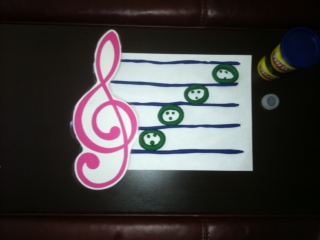
Play-Doh Re-Mi, Anyone?
Sometimes it escapes me how much difficulty piano students have learning to read notes on the staff. You see, the more than 30 years that I’ve spent playing the piano have fooled me into thinking that reading notes on a music staff is EASY-PEASY. Not to worry – reality quickly sets in once my students sit at the piano and I put a sheet of music in front of them. The cheerful, excited faces they had during the pre-staff notation days of their lessons are suddenly absent – replaced by blank stares and a series of failed attempts at finding the right note. So, what to do?
Enter… Play Doh!
Step 1: Have the student make a staff. Some surprising revelations can occur at this time. Here’s one from a student: “There are only 5 lines?”
Step 2: Now the student can add space notes or line notes. Another revelation: “You mean the space notes have to fit BETWEEN the lines?”
Step 3: The teacher can add a Treble Clef OR Bass Clef. Then give the student the appropriate phrase to remember the note names. Now have them make up a phrase of their own.
Step 4: Take a picture of that beautiful smile your student is flashing!