Never Give Up!

Yesterday we celebrated Mother’s Day. With that comes reflection on how becoming a mother has changed your life and how your kids have grown. My son is the kid playing in the video above, and I have to tell you in the beginning it was very challenging to teach him how to play the piano. Like any kid he didn’t like the idea of practicing and he got easily frustrated with all that playing the piano involves. Our lessons often ended with both of us upset and ready to throw the piano out the window, but it was too heavy for either of us to pick up! This continued for several years and then one day after about 7 years something changed.

Today we are both so glad that we did not give up. It’s pretty often these days that my husband and I wake up to the sound of live jazz piano being played in the morning. We can hardly believe that we even have to ask him to take a break from practicing sometimes to do important things like eating and sleeping. I’m talking about a teenage boy choosing piano over eating! That alone is enough for me to know that when it comes to piano lessons and frustrated kids and parents giving up cannot be an option. If you hang in there – especially on the most difficult days, the day will come when your child too will be glad you didn’t allow them or yourself to give up!

Happy Mother’s Day – everyday!

Custom T-shirts for Your Studio

tshirts

When my students and I were invited to play at a local retail store that was featuring a day of continuous piano music from area piano teachers and their students, I got the idea to have everybody wear something that showed they were part of The FAME School. I decided to try CustomInk, a company which allows you to design your t-shirt online. The process was EASY and quick! They sent me digital proofs before filling my order  and shipping was FREE. Here’s how they looked at the performance:

Custom Ink

Everyone was proud to wear their shirt to the event, and I honestly think it pumped them up a little bit! So, if you’re looking for ways to add some social to the piano lesson, I suggest getting some studio t-shirts that everyone can wear to performances or maybe even to group piano class or a group outing to see a concert!

Why It’s Called The “Trouble” Clef

Trouble Clef

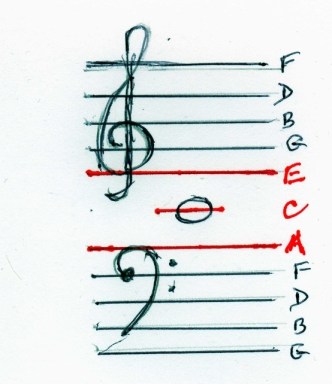
On a recent visit to Michael’s I found this cute little notepad. As with a lot of random things that are in my studio at any given moment, it became a teaching aid in a piano lesson. Just as I was presenting the treble clef symbol using Faber’s Queen Treble Clef song from My First Piano Adventures, my eyes were drawn to this notepad. The treble clef at the bottom of the paper was a perfect visual to reinforce the lyrics of the song which say she got in trouble for trying to play the low notes!

Hmmm, was it genius or merely desperation that led me to that discovery? Clearly there is a thin line between the two!

Visually Describing Your Studio

FAME Word Art

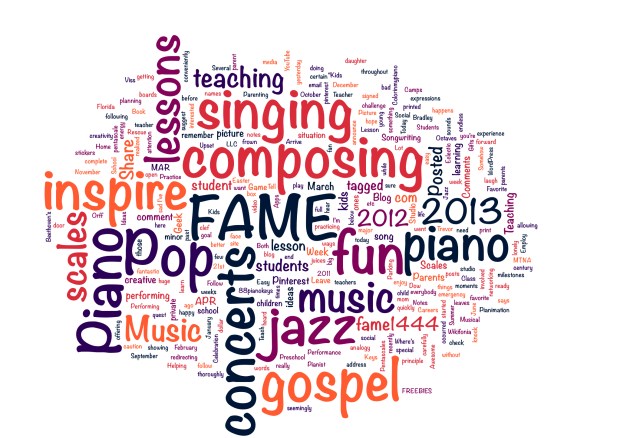
Today I discovered the coolest app in a post from the blog An Ethical Island. The app is called CloudArt and is available for iPad in the iTunes store. The app is quite versatile in that you can type in text and it will give you a design. You can also type in a website address and it will generate a design from the website itself! You can even choose your own colors and fonts. The pic above is the what I got when I typed in my website and  added more words that describe my studio. It would be great to frame and hang up in the studio so that parents and kids get a quick visual of what’s in store for them when they take lessons. The art generated from the app would also be great for marketing materials. Another possibility is musical terms review. Students could type in words and generate a graphic. I think visual learners might really benefit from something like that. At  just $0.99 this little app can have a big impact!

What do you think? If you buy the app and create a graphic I’d love to see it in a comment below!

I can see so many possibilities for using this app for the piano studio.

My Favorite Piano Teaching Ideas From Pinterest

Welcome to the Piano Geek Week edition of The FAME School Blog! If you haven’t heard about or signed up for Andrea and Trevor Dow’s Piano Geek Week, be sure to check it out! But, first look below for some fantastic piano teaching finds from Pinterest.

Did you know that The FAME School is on Pinterest? It only takes a few seconds on pinterest to get your creative juices flowing. Here are some of my favorite piano teaching ideas from the visual social networking site. Click the picture links to view the pins.

Music Notation Made Easy

wikipedia notation

Noodle Notes for Composing

noodle notes

Teach Piano From The Parking Lot

driveway piano

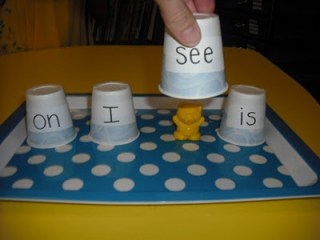
Where’s The Bear – Convert to Note Recognition Game

where's the bear

There are many more very cool teaching ideas on my pinterest site. Everything is conveniently organized and categorized so that you can quickly find something that interests you. There are boards for piano teaching,  preschool music, songwriting for kids, music class and more!

A word of caution: Pinterest can be VERY addicting!!!

Now, for more inspiration visit the Piano Geek Week Site!

How To Rescue Your Piano Lesson When Students and Parents Arrive Upset

Oh No!

Has this ever happened to you? It’s 3pm and you’re ready to wow your student with the fantastic piano lesson you have carefully planned. You can just imagine the joy on her face when you announce the special song that she will be learning today. You hear a knock on the door, open it and your student walks in with a frown on her face. She won’t speak to you, and when you look at her mom walk in she has a frown on her face too! The mom informs you that the child got in trouble at school and it is clear that the child is guilty as charged.

 At times like this it may seem that there is no hope for redirecting this family so that you can have a great lesson, but the piano teaching genius in you knows better! Now is the time to abandon whatever plans you had prior to the student’s arrival and pay attention to this emergency situation. (Yes, it is an emergency! ) It is up to YOU to turn this situation around for everybody involved.

The guiding principle you will use in this situation is one that was shared recently on the South Florida Orff Blog about how to be a 21st century teacher:

Make it (your lesson) REAL LIFE relevant!

With that said, here are 6 steps you can take to rescue your lesson:

1. Make them laugh!  Your number one goal is to first make everybody in the room laugh as quickly as possible. This will break down any barriers and help them refocus. You could say in a horrified voice something like, “What you just told me makes me hear this music…” (That’s when you go to the piano and play the famous notes of Beethoven’s 5th)

2. Offer a Solution – Your new goal is to get the student to stop worrying about the problem and focus on what she can do to have a successful lesson. You can suggest that the two of you write a song about the situation.

3. Invite The Student To The Piano – You will need to help everybody remember why they came – it’s a piano lesson!

4. Ask questions – Should the song have a happy sound or a sad sound? What kind of scale can we use to make that sound? What words do we need to say in the song?

5. Write It Down – Help your student write out the new song complete with a title. You can take the time to explain some theory concepts like treble clef, bass clef, how to notate melodic and harmonic sounds. Keep it simple and easy though. Even allow the student to just write out the note names.

I Am Sorry Song

6. Take A Picture  – Empower your student to have a better day at school the following day by taking a picture of her holding the “sheet music” for the new song. Tell her that she can print the picture and give it to her teacher the next day. Employ humor once again by allowing her to use fun facial expressions to show how sorry she is about what happened.  Let her choose which picture really shows how she feels.

Can you remember a time when your student and parent showed up to the lesson upset about school? Tell us about it in a comment below!

Piano Geek Week: April 29-May 3

Piano Geek Week


The highly creative Andrea and Trevor Dow of TeachPianoToday.com are hosting an International Week of the Piano Geek from April 29-May 3, 2013. Andrea and Trevor have a seemingly endless treasure of creative teaching ideas and resources. I have blogged here about their Shhh! Your Piano Teacher Thinks This is Practice book before and am a huge fan of their work. Their blog, teachpianotoday.com is full of inspirational ideas for out of the box piano teaching, so I am sure that this latest creative offering is going to be awesome. According to the website, their will be blog showcases, Facebook events, teaching tips, resource lists and FREEBIES! To participate, go to pianogeekweek.com and sign up today so you don’t miss out on the fun!

A Celebration of Octaves!

Octaves!

Do you remember the first time you realized your hands had grown enough for you to reach an octave on the piano? It happened to my daughter today, and she was so excited! She yelled for me to come look and take a picture. These are the moments that are priceless.

Parents, moments like this are the reason to encourage yourself and your child to hang in there when music learning gets tough.

Scary Scales – An Unfortunate Musical Analogy

Scary Scales

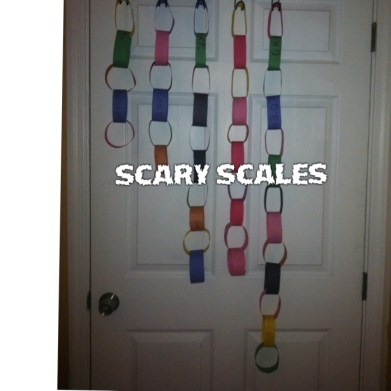
The frenetic scales loop race is heating up in my piano studio! Several weeks ago we began a quest to learn as many scales as we can before the end of the school year. As students have begun to complete the major scales we’ve started learning how to change them into minor scales. To help the kids hear the difference between the two I describe the minor scales as the sad sounding ones or scary ones and the major ones as the happy ones. Well, yesterday after showing a student how to figure out the minor scales on his own

I heard myself say,

“Let’s play some more scary scales”.

I immediately realized that this analogy went against everything I’ve done to try to help kids NOT see scales as scary, evil things!

Oh well, my bad!